
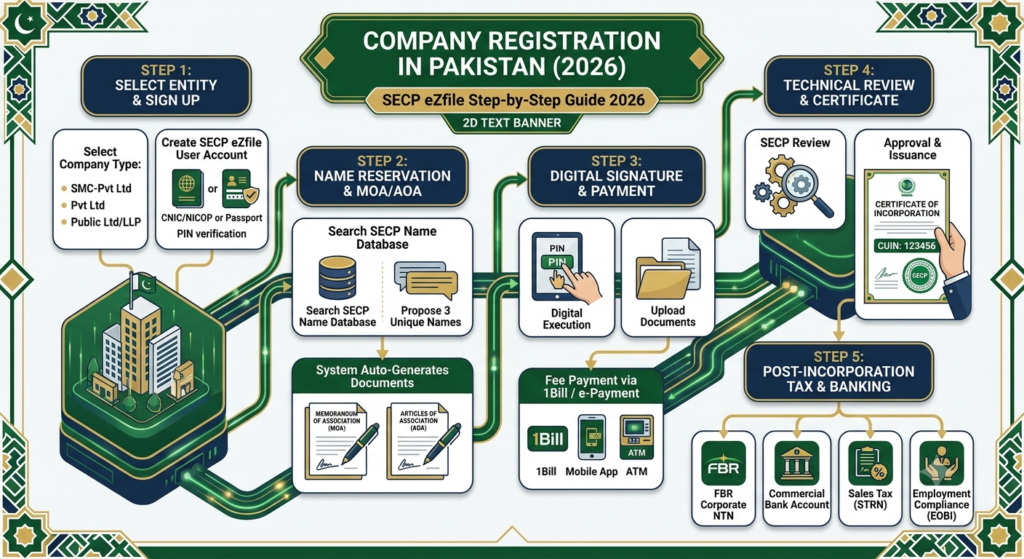
Establishing a formal business entity in Pakistan marks an exciting milestone for entrepreneurs, startups, and international investors. Over the past few years, the Securities and Exchange Commission of Pakistan (SECP) has revolutionized the incorporation landscape. Today, you can complete the entire company registration process digitally from your computer through SECP’s modernized eZfile corporate portal.
Registering your business grants you legal protection, limited liability, and enhanced credibility with corporate banks and investors. This comprehensive guide walks you through the latest 2026 regulations, necessary documentation, step-by-step digital filing, and post-incorporation tax requirements.
1. Choosing the Ideal Business Structure
Before you start your application on the SECP portal, you must choose the right legal structure for your enterprise. SECP offers several corporate vehicles under the Companies Act, 2017.
Single Member Company (SMC-Pvt Ltd)
A Single Member Company suits individual founders who want sole ownership while protecting their personal assets. In this structure, one individual acts as both the sole shareholder and the director. Furthermore, you must nominate a secondary individual to take over company affairs in the event of death or incapacity.
Private Limited Company (Pvt Ltd)
The Private Limited Company remains the most popular structure for startups, small businesses, and joint ventures in Pakistan. You need a minimum of two directors and two shareholders to register this entity. Additionally, a Private Limited Company can expand up to fifty shareholders, making it the preferred choice for raising capital from external investors.
Public Limited Company & LLP
A Public Limited Company requires at least three directors and seven shareholders. Large organizations use this structure when planning to issue shares publicly or enter highly regulated markets. Alternatively, professional firms like law practices and accounting agencies often register as Limited Liability Partnerships (LLPs) for operational flexibility.
2. Essential Prerequisites and Document Checklist
Preparing your documents in advance speeds up the SECP approval process. Therefore, you should gather all required details before creating your online account.
You must prepare clear color scans of Computerized National Identity Cards (CNICs) or NICOPs for all Pakistani directors and shareholders. For foreign nationals, you must provide valid passport copies instead. In addition, you must specify your proposed company name, registered business address, principal line of business, authorized capital amount, and active contact numbers for each director.
3. Step-by-Step SECP Company Registration Process
SECP has streamlined company formation into four major steps within the eZfile system. Consequently, applicants no longer need to submit physical paper files at SECP physical offices.
Step 1: Account Creation on SECP eZfile
First, visit the official SECP eZfile web portal. Every director and subscriber must create an individual user account using their CNIC or passport number. The system verifies your mobile number and email address instantly. After activation, you can initiate the combined incorporation workflow.
Step 2: Company Name Reservation
Next, submit your proposed company names through the system. You should provide three unique name choices in order of preference. The portal automatically checks for duplicate names in the SECP database. However, SECP officers still review the name to ensure it does not contain prohibited, offensive, or misleading words. Once approved, SECP reserves your company name for 60 days.
Step 3: Drafting Constitutional Documents
After name approval, you must complete the incorporation form and constitutional documents. The eZfile platform auto-generates the Memorandum of Association (MOA) and Articles of Association (AOA) based on your selected business sector. The MOA outlines your primary business objects, while the AOA governs internal rules and management procedures. Every director must review these auto-generated documents carefully.
Step 4: Digital Signing, Fee Payment, and Submission
Finally, each director logs into their respective eZfile account to sign the documents digitally using their security PIN. After digital execution, generate the government fee challan. You can pay the incorporation fee through online banking, credit card, or 1Bill. Once payment clears, submit the final application for technical review.
4. Processing Timeline and Certificate Issuance
SECP technical teams review complete incorporation filings promptly. If your application contains no errors or omissions, SECP issues your Certificate of Incorporation within 2 to 5 working days.
The digital Certificate of Incorporation contains your official Company Universal Identification Number (CUIN). This document serves as permanent legal proof that your business exists as a corporate entity in Pakistan.
5. Post-Incorporation Compliance Sequence
Obtaining your incorporation certificate is just the first phase. Next, you must complete mandatory tax and banking steps to start commercial operations legally.
- Federal Board of Revenue (FBR) Registration: First, register your new company on the FBR Iris portal to obtain a corporate National Tax Number (NTN).
- Opening a Corporate Bank Account: Next, visit a commercial bank with your Certificate of Incorporation, MOA, AOA, NTN, and Board Resolution to open your business bank account.
- Sales Tax Registration (STRN): In addition, if your business trades physical goods or taxable services, apply for Sales Tax Registration with FBR or regional revenue authorities.
- Provincial & Labor Registrations: Finally, enroll your company with the Employees’ Old-Age Benefits Institution (EOBI) and provincial social security departments as required by employment laws.
Quick Checklist for SECP Registration Success
- Choose between a Single Member Company (SMC) or a Private Limited Company (Pvt Ltd).
- Prepare clear CNIC or passport scans for all directors and shareholders.
- Create individual eZfile portal accounts for every board member.
- Select three unique, compliant company names for approval.
- Review and digitally sign the auto-generated MOA and AOA.
- Pay the SECP fee online and track your application status.
- Secure your FBR corporate NTN and open a business bank account immediately after approval.